
Candidates
Candidate guide
Conditions, documents, submitting your file, campaign, observers and results.
Key points
- 1Submit your file online from 31 October to 7 November 2026 (11:59 pm).
- 2Only one position per candidate; non-refundable fees, paid against a receipt.
- 3Provisional list on 11 November, appeals on 11 and 12 November, final list on 13 November.
- 4Campaign from 14 November to 10 December; election silence on 11 December.
- 5Vote on 12 December; each candidate can appoint observers.
1The 4 positions to fill
Single-member, first-past-the-post vote in one round. The elected President of the Executive Bureau appoints the other members of their bureau; the elected President of the Committee appoints at least five members of the Committee (resolutions R1 and R2).
| Position | Candidacy fee (non-refundable) |
|---|---|
| President of the Executive Bureau | 5,000 USD |
| Treasurer | 3,000 USD |
| Auditor | 2,000 USD |
| President of the Committee | 2,500 USD |
2Conditions to be a candidate
Conditions proposed by resolution R9 (and R5 for age), submitted to the Extraordinary General Assembly. They take up Article VII of the 2022 statutes, extend it to the four elected positions and make it more precise. You must meet all of them on the date you submit your file.
- be at least 21 years old on the date of submission (R5);
- be an active member of CAMCO;
- have Cameroonian nationality;
- have lived in the United States for at least 1 year on the date of submission;
- hold a valid Egyptian residence permit;
- hold a valid consular card;
- hold a Cameroonian passport valid for at least 6 months;
- not sit on the Transition Committee or on the CAMCO Electoral Committee (resign from the Committee at the latest when you submit);
- stand for only one position and pay the candidacy fee (R3).
| Position | Additional conditions |
|---|---|
| President of the Executive Bureau | Lease contract in your name or in your spouse's name. |
| Treasurer | Home address in the United States (the lease does not have to be in your name). |
| Auditor | Home address in the United States (the lease does not have to be in your name). |
| President of the Committee | 10 years of residence in the United States; lease contract in your name; sworn statement that you are married or in a couple. |
3The documents to prepare
Accepted formats: PDF, JPG or PNG, 5 MB maximum per file. The documents stay confidential: they are never published.
| Document | For whom |
|---|---|
| Identity page of the Cameroonian passport (valid for 6 months) | Everyone |
| Valid consular card (front and back) | Everyone |
| Valid U.S. photo ID (driver’s license or State ID) (front and back) | Everyone |
| Head-and-shoulders ID photo, light background (shown on the ballot) | Everyone |
| Receipt for the candidacy fee | Everyone |
| Lease contract in your name or in your spouse's name | President of the Executive Bureau |
| Lease contract in your name + sworn statement (tick box) | President of the Committee |
| Programme or statement of intent (PDF), published on your profile | Optional |
4Submit your candidacy step by step
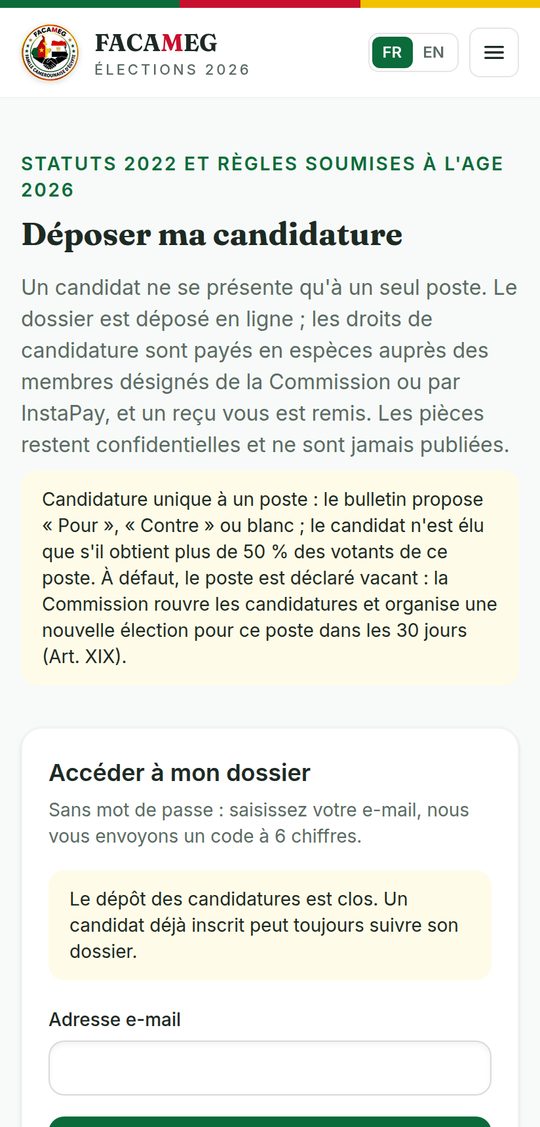
Everything is done online, from Run for office (Members area menu or the “Run for office” tile in My space).
- 1Read the File my candidacy page: role of each position, conditions, documents and fees.
- 2Open your file: enter your e-mail, then the 6-digit code you receive (name, phone and e-mail must match your member record).
- 3Choose your position (only one).
- 4Upload your documents and your photo; check that they are readable and valid.
- 5Choose the colour of your ballot: a colour already taken for your position is greyed out.
- 6Submit: you receive an acknowledgement of receipt by e-mail; your file moves to the status “Submitted”.
5Following your file
The status of your file is shown in your candidate space; you are told about each change by e-mail.
| Status | Meaning |
|---|---|
| Draft | File started, not submitted. |
| Submitted | Received by the Commission. |
| Under review | Checking of conditions and documents (8 → 10 November). |
| To be completed | A document is missing or unreadable: the message tells you what to do, before the provisional list. |
| Accepted | You are on the list of candidates; your colour is locked. |
| Rejected | The reason is given; you can appeal on 11 and 12 November. |
Appeals: in writing and with reasons, sent to the Commission on 11 and 12 November. The final list of candidates is published on 13 November.
6The campaign
From 14 November to 10 December (11:59 pm). 11 December is a day of election silence.
- Your public profile shows your photo, your colour, your position and your programme.
- Your colour is used on the ballot, the posters and the results table, always with your photo and your name.
- Respect the members: no pressure on a voter, no asking for codes, no “assisted voting” on your phone.
7Your observers
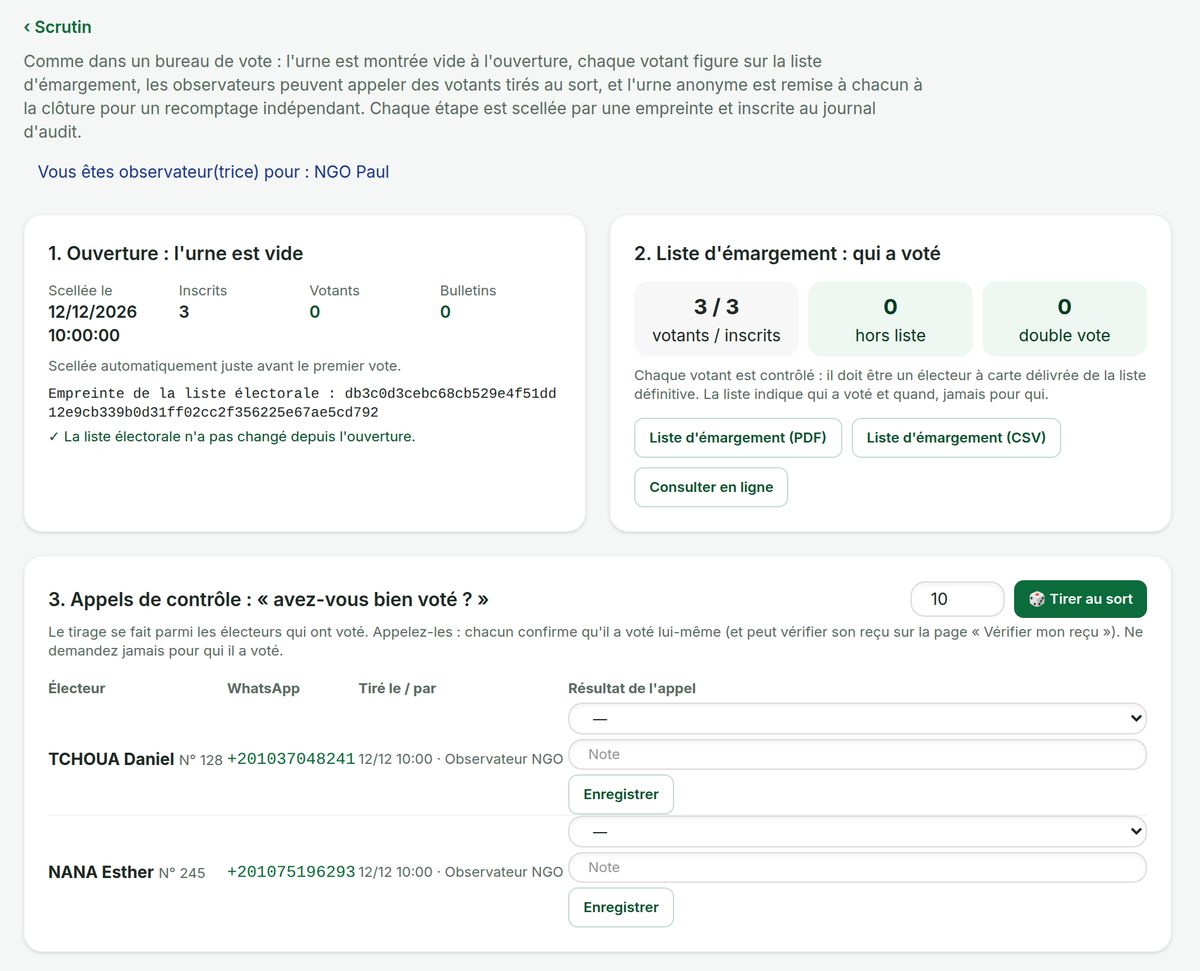
Each candidate can appoint one or more observers. Their account, created by the Commission, lets them monitor the vote as in a polling station, without ever seeing how voters voted.
- 1Give the Commission the name, e-mail and phone number of your observer (before 21 November, so they can take part in the trial vote).
- 2The Commission creates their account, linked to your candidacy; they receive an activation link by e-mail.
- 3On voting day, they follow the opening and the turnout register, call voters drawn at random, recount the ballot box at closing and sign a statement that is included in the official report.
Their full mission is described in the Observer's guide.
8Results and handover
The candidate with the most votes for a position is elected. If only one candidate stands for a position, they must get more than 50% of the voters for that position (R8); if not, the position is declared vacant and a new election is held within 30 days.
- Provisional results on 13 December; claims within 24 hours.
- Final results and handover on 15 December: the platform sets up the elected Bureau (accounts and roles).
9The calendar
| When | Step |
|---|---|
| 17 Oct. → 13 Nov. | Member update and card purchase (deadline: Friday 13 November, 11:59 pm) |
| 17 → 31 Oct. | Commission tour of the focal points |
| 31 Oct. → 7 Nov. | Submission of candidacies (Saturday 7 November, 11:59 pm) |
| 8 → 10 Nov. | Review of the files by the Commission |
| 11 Nov. | Provisional list of candidates; appeals on 11 and 12 November |
| 13 Nov. | Final list of candidates |
| 14 Nov. → 10 Dec. | Election campaign |
| 16 → 20 Nov. | Provisional voter list and claims |
| 21 Nov. | Final voter list (frozen); trial vote opens |
| 2 Dec. | End of the trial vote |
| 11 Dec. | Election silence |
| Saturday 12 Dec. | Online vote, from 8 am to 8 pm |
| 13 Dec. | Provisional results; 24 hours for claims |
| 15 Dec. | Final results and handover |
10The rules in force
The statutes of 18 December 2022 are in force. The urgent 2026 election rules (R0 to R9: elected positions, candidacy fees and conditions, age, card, single candidacy…) are submitted to the Extraordinary General Assembly, held in four sessions (Maadi, Faisal, Sheikh Zayed, Sakan Misr). This guide presents them as proposed; if one of them is not adopted, the Commission publishes the rule that applies and updates this guide.
11Help and contacts
CAMCO Electoral Committee — WhatsApp and calls: +20 114 684 6864 · E-mail: info@electionfacameg.online · Official website: camco.allcommunity.online. App support: WhatsApp group “CAMCO App — Mutual help & Assistance” (“More” tab in the app).
Edition of 15 October 2026 (online votes, neighbourhoods and sponsorship)